Zephras Collector
A free WoW Forever addon that records what you discover while you play and links anything you hover to its zephras.com page.
The Uploader installs the addon and keeps it up to date. What each version changed is in its changelog on CurseForge.
Quick links to zephras.com
Hover an item, spell, NPC, or quest and press Ctrl+C, or right-click the minimap button for your target. A small box opens with that record's zephras.com address, ready to copy into your browser. Press Ctrl+C again to copy it and close the box.

- Where it works: tooltips, the quest log, the quest tracker, the quest window an NPC opens, the reputation list, mounts, toys, buffs, tracked recipes, and links clicked in chat.
- Put in chat: the box's "Put in chat" button (or Shift+Enter) puts the name and link into your chat box; you choose whether to send it.
- Your own key: change Ctrl+C under Key Bindings, "Zephras".
What it records while you play
Nothing to set up: no chat messages and no change to your interface. It opens a window by itself only for the welcome and the combat log question, once each, and a login reminder while the Zephras Uploader is not found.
- NPCs you target, and where they stand.
- Quests you pick up and turn in, with the experience, money, and reputation they paid.
- Loot from corpses, chests, herbs, veins, and fishing.
- Objects you walk up to: chests, herbs, veins, and mailboxes, with where you stood and which way you faced.
- Vendors, trainers, and flight masters you open.
- Boss fights: which dungeon or raid boss a fight was.
- Gathering skill: your skill, skill-ups, and failed attempts when you skin, pick herbs, or mine.
- Your spellbook: the IDs of the spells your character and pet know, once each.
- Your open quest objectives at each kill (from version 1.14.0), so a quest item's drop chance counts only the kills that could drop it.
- How your play time was spent (from version 1.15.0): every five minutes, the seconds your character spent moving, standing still, marked away, in combat, and on a flight path.
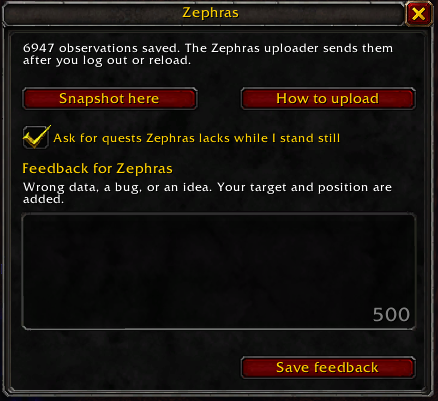
- Quests nobody has met yet: while you stand still out of combat, outside dungeons, and off flight paths, it asks the server about one quest Zephras has no text for every few seconds, at most 200 a session. Untick "Ask for quests Zephras lacks while I stand still" in the Zephras panel to stop it.
Off unless you turn it on: "Record my combat logs and character for Zephras" in the Zephras panel (the addon also asks once at login) turns on the game's advanced combat log and notes your gear, stats, talents, buffs and debuffs, and spell texts out of combat, and your buffs, debuffs, and attributes with the time as each fight starts; unticking it puts your log setting back. The Zephras Uploader sends your own fights, with every player's name removed, after you close the game. They earn no rank points and are never published. Only what is the same for everyone of that class, race, and level is: the base attributes, the base of attack power, and what a point of an attribute gives. The gear planner shows them, never whose they are.
The Zephras panel
The first time you log in, a short welcome window explains how your discoveries reach zephras.com; the panel's "How to upload" button shows it again.
Click the minimap button or type /zephras for the panel: a snapshot button, "How to upload", the quest-asking checkbox, and a feedback box (your feedback reaches the team with your next upload). Drag the minimap button to move it.
Point at the minimap button for your Zephras rank and, during a season, your season rank; the panel's Rank tab shows its badge and a ring to the next rank. It needs the Zephras Uploader and shows your rank as of your last upload.
The panel's first line says whether the Zephras Uploader is signed in, signed out, not found, or turned off. While it is not found, a small window says so at login; "Don't show again" hides it for a week. Uploading on the upload page instead? Tick that box or close the window.
How your data reaches the site
- Log out or type /reload: the game saves what the addon recorded.
- Upload the save on the upload page, or let the Zephras Uploader send it after you log out.
- Your first upload waits for a reviewer; later clean ones are accepted automatically. Accepted is not yet published: a record appears once a trusted player or two players agree.
What it never records
- Your character's name or anyone else's.
- Anything the game hides from addons: such values are skipped, never stored.
- Player chat or whispers (only lines NPCs say), or anything personal.
Light on your game: its save file stays under 3.4 MB. More in the privacy notice.
Help
Ask in #collector-help on the Zephras Discord, use the feedback page, or write to admin@zephras.com.